

Published May 16, 2026, 9:00 AM EDT
Afam's experience in tech publishing dates back to 2018, when he worked for Make Tech Easier. Over the years, he has built a reputation for publishing high-quality guides, reviews, tips, and explainer articles, covering Windows, Linux, and open source tools. His work has been featured on top websites, including Technical Ustad, Windows Report, Guiding Tech, Alphr, and Next of Windows.
He holds a first degree in Computer Science and is a strong advocate for data privacy and security, with several tips, videos, and tutorials on the subject published on the Fuzo Tech YouTube channel.
When he is not working, he loves to spend time with his family, cycling, or tending to his garden.
I read Google's announcement about the Googlebook, and I couldn't help but be impressed by how promising this device looks. The three features that grabbed the headlines were the Magic Pointer, the Glowbar, and the seamless Android integration, which only reinforces the fact that the Googlebook will be released on premium hardware from Acer, ASUS, Dell, HP, and Lenovo.
That said, it's one device I'd personally avoid, and I'll explain why you probably should too. But just in case you still can't wait to buy one, I'll provide a checklist of things to do before you make a purchase.
 Related
Gemini isn’t as useless as it was when you tried it two years ago
AI that I first despised is now my Google Assistant replacement.
What Google actually means by "intelligence system"
This is a bigger shift than it sounds

Googlebook's intelligence system is Gemini Intelligence, and it turns the device into a truly "AI-native" platform. In Google's own words:
...we are moving from an operating system to an intelligence system...
I've seen several blogs gloss over this statement as if it's mere marketing language, but there are deeper implications.
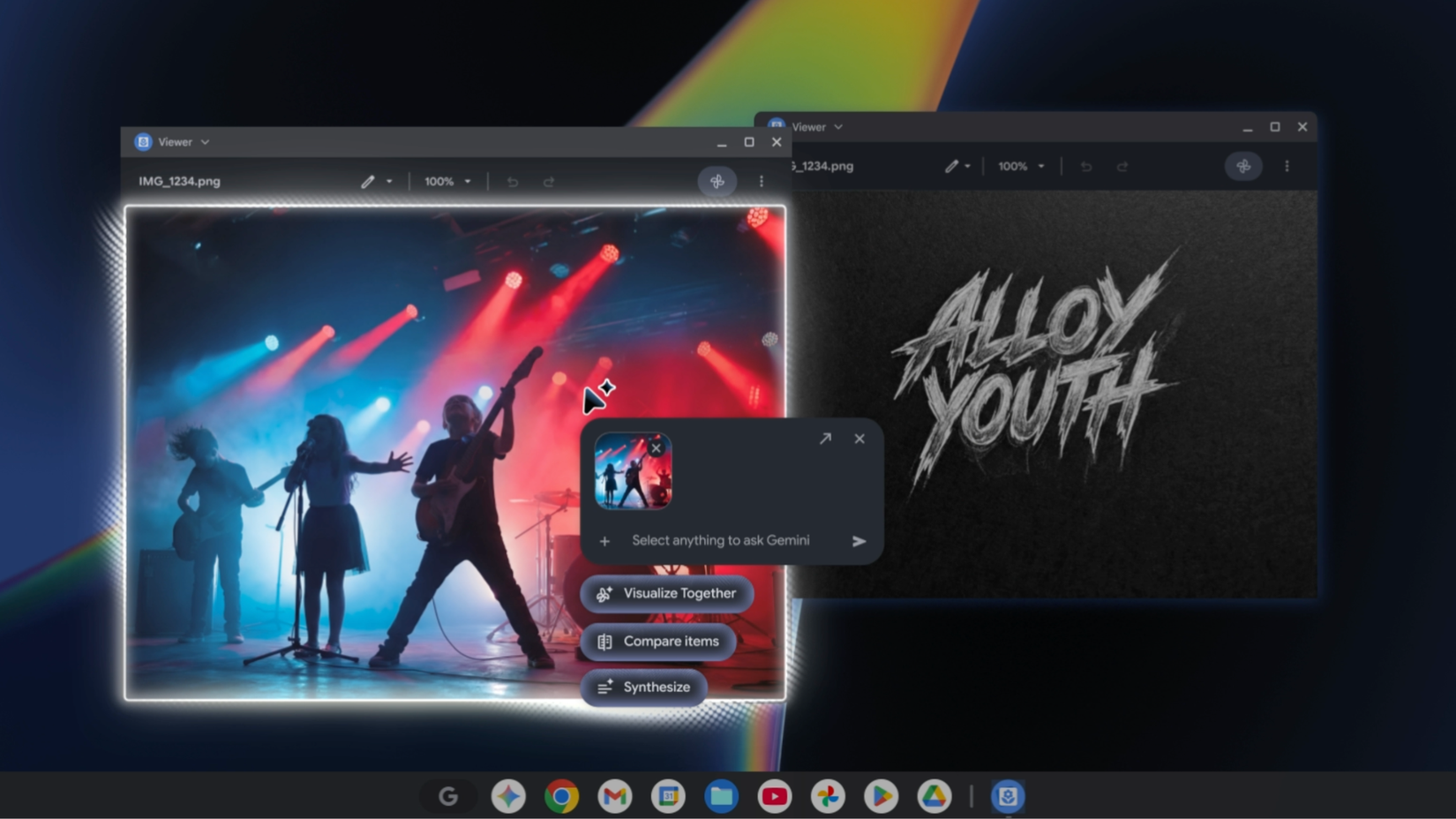
Magic Pointer is central to this device, allowing Gemini to read anything on your screen by simply wiggling the cursor. Emphasis on "anything." It could read an email and automatically schedule a meeting based on its contents, or analyze two side-by-side images and merge them into a single image. This is the biggest evolution in the cursor since right-click, turning it into a full-fledged AI sensor.
There is also the Create Your Widget feature that allows Gemini to build a comprehensive dashboard from data pulled from your Gmail and Calendar. The device also introduces a Quick Access feature that lets you access your Android phone's files in its file browser without transfers or cables.
The common denominator with all these features is that, while being genuinely useful, they rely on transferring and analyzing user data, and that's the part you should pay closer attention to.
What Gemini collects — and for how long
Three retention windows you probably didn't know existed
 Credit: Google
Without speculating, I'd be directly referencing Google's Gemini Apps Privacy Hub. Each time you use Gemini, Google collects certain data elements. This is a comprehensive list that can include:
- Conversations and prompts
- Uploaded content
- Screenshots and screen captures
- Browser data (page content, connected app data from Gmail, Calendar, and Drive)
- Your location,
- Your device data
- Context from smart home services
These are the same types of data that Magic Pointer can feed into Gemini. But in this case, the transfer occurs because your cursor moved and not because you intentionally typed something into a chat box. Once your data is transferred to your account stored on Google servers, the three data retention windows become significant:
- 72 hours: This is a baseline, even when you turn off Gemini Activity completely. You can't opt out of this window because the data is needed for service delivery and feedback processing.
- 18 months: This is the default for adult users (18 and older), and even though you can change this to either 3 or 36 months, the setting is buried, and most people would never look for it.
- 3 years: When your conversation is reviewed by a human reviewer, it's held outside your Google account for this period, and you can't delete it.
As per Google's advice, you shouldn't input anything you wouldn't want a human reviewer to see. This only makes you wonder what the Magic Pointer can read quietly. Just for comparison, here is how Gemini stacks against other providers:
|
Google Gemini |
18 months |
|
ChatGPT (OpenAI) |
30 days for chat history off mode |
|
Microsoft Copilot |
~30 days (varies by product and configuration)~30 days |
The phone sync feature most people will set up without thinking
Why "seamless" is also a wider opening
 Credit: Google
Googlebook will make Quick Access and Cast My Apps frictionless features. Without any extra setup, phone apps will run on the laptop screen, and files will be viewable from the laptop's file browser. The fact that this will require no setup is an actual problem.
Phones are typically the most personal data stores we have, containing our location history, health data, banking apps, private messages, and photos. With Gemini running as an intelligence system on Googlebook, the device now has a live bridge to all this personal data. This is not to infer that Google will be reading your WhatsApp messages, but the simple logic is that as data spreads across devices, you inevitably increase the surface area for breaches, subpoenas, and targeted advertising.
This is not exaggerated, considering that just in July 2025, several outlets, including DigWatch, confirmed that Google Gemini can access WhatsApp, SMS, and calls by default. It's worth keeping that in mind when deciding how much of a phone's sync features you can trust. The point isn't that all connections should be avoided. It's understandable to connect a task manager or productivity app, but more caution is required if your bank or health app connects through a Gemini-powered bridge.
Four things to do before you turn it on
The setup guide Google's promotional video skips
Privacy concerns are the only reason I will be wary of purchasing a Googlebook. A device that can have so much access to my data, especially if it can happen in real time, is a bit too powerful for comfort. If you must get one, I would recommend you do four things first:
- Turn off Gemini Apps Activity. You can locate it by opening the Gemini app, tapping your profile photo, selecting Gemini Apps Activity, and toggling Keep activity off.
- While in the Gemini Apps Activity window, set auto-delete to 3 months by changing Deleting activity older than 18 months to 3 months.
- Audit Personal Intelligence by tapping your profile image on the Gemini app or web interface and selecting Connected apps. Walk through them one by one and disable any that don't require AI access.
- Consider using a new account different from the one that holds your personal and important data.
It's more than the Googlebook
It would be unfair to attribute the use of AI in such a personal way only to Googlebook. This is the direction of modern technology. Microsoft, Apple (Apple Intelligence), and all the big companies are in a massive AI adoption race, and the more they can use AI to make devices more convenient for everyday users, the more adoption and market share they gain.
So, even if you choose not to get a Googlebook simply because of how data retention and integration with Gemini affect the device, my prediction is that it won't be long before it becomes the new normal. But until then, I'll pass on this device.


